Does Amazon Accept Doctor's Notes? Yes, but DLS Wants the E103
Written by SwiftCareMD Editorial Team
Published Nov 19, 2026 · 12 min read · How we review articles
Yes, Amazon accepts doctor's notes. But if you're out more than 2 days and request a leave, DLS usually wants the E103, filled out by a licensed provider.
Short answer: yes, Amazon accepts doctor's notes. But if you're out more than 2 days and request a leave of absence, Amazon's Disability and Leave Services (DLS) usually wants a specific form called the E103, filled out by a licensed provider. A regular doctor's note often isn't enough.
If DLS emailed you a deadline and your doctor can't see you until after it, or simply won't fill out the form, that's the worst feeling. Meanwhile, every shift you miss can come out of your UPT, and you're wondering if this could cost you your job.
Here's the good news: you don't have to wait for that appointment. At SwiftCareMD, we already have Amazon's forms, so there's nothing for you to upload. You fill out a 3-minute patient intake form on your phone, and Dr. Scott Nass, a licensed physician, reviews your symptoms online. If it's medically appropriate, he fills out and signs your E103.
Too sick to read all this? We get it. Start your patient intake form here, choose "Amazon," and come back to the rest when you feel better.
What Does Amazon Need From You When You're Sick?
It depends on how long you're out.
If you're missing a shift or two, you usually don't need a note at all. Your UPT (Unpaid Time) or PPT (Paid Personal Time) covers it, according to Amazon's policy guide for US fulfillment workers. You just report the absence in the A to Z app.
If you're out more than 2 days, you can request a leave of absence in A to Z, which is worth doing if your UPT is running low. Once you're out more than 3 days in a row, Amazon usually treats it as a leave anyway. Either way, DLS usually wants two forms. Your provider fills out the E103, and you sign the E117, which lets DLS contact your provider with questions. A regular doctor's note often gets sent back.
At SwiftCareMD, our Amazon package includes the E103 and E117 that DLS asks for, plus a doctor's note, all for $39.99.
Why Getting to Urgent Care Is Difficult When You Have the Flu
You could get Amazon's form from urgent care, but here's what that usually looks like. You drag yourself out of bed with a fever, find a ride, and sit in a waiting room full of other sick people.
Then the bill comes. Without insurance, an urgent care visit with a flu test runs about $175 to $350, according to Solv.
And after all that, some urgent cares won't even fill out the form. One worker on r/AmazonFC said their urgent care gave them a note but "refused to fill out the Amazon form."
Your own doctor might be the better call if they can see you before your DLS deadline. If they can't, our Amazon package is $39.99, and you never have to leave your bed.
Does Amazon Accept Online Doctor's Notes?
Yes, Amazon often accepts online doctor's notes. Some workers on r/AmazonFC say an online doctor's note got their time excused.
For a leave, what matters to DLS is getting the E103 it asked for, signed by a licensed provider. Dr. Nass is licensed in 46 states plus D.C., and he fills out Amazon's own E103 when it's medically appropriate.
If DLS has questions about your forms, they can contact SwiftCareMD. Our practice phone and fax are listed right on your forms.
How to Get Your Amazon Forms From SwiftCareMD Without Leaving Bed
At SwiftCareMD, the whole process happens on your phone, in four steps.
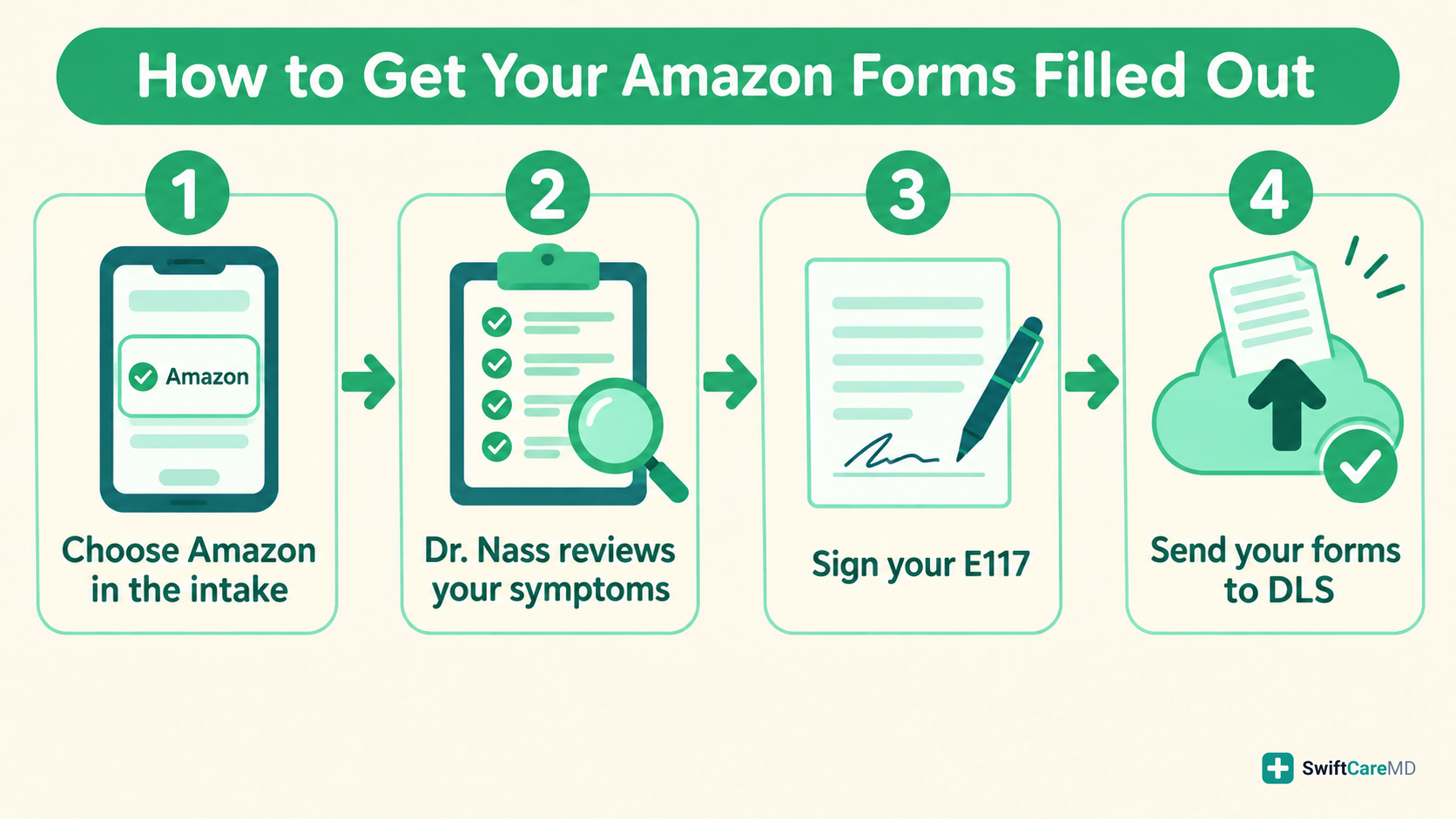
Step 1: Fill Out the Patient Intake Form and Choose "Amazon"
The patient intake form takes about 3 minutes on your phone. When it asks what your note is for, choose "Amazon," then add your job title and your DLS case number if you have it. You don't need to find the forms DLS sent you, because we already have them.
No DLS case yet? You can still fill out the intake now. Just request your leave in the A to Z app under "Time Off and Leave" so DLS opens a case.
Step 2: Dr. Nass Reviews Your Symptoms
Dr. Nass reviews requests from 6 AM to 11 PM Pacific (9 AM to 2 AM Eastern), often within minutes. For example, say you send yours at 9 PM Pacific. That's still inside review hours. If you send it at 1 AM Pacific, he'll review it first thing in the morning.
If it's medically appropriate, he fills out and signs your E103. If he declines because it isn't medically appropriate, you're refunded.
Step 3: Download Your Forms and Sign Your E117
If your request is approved, we email you a link to our secure portal, where you can download your doctor's note, E103, and E117. Your E117 already has your name, date of birth, and our practice filled in. You just sign it, date it, and add your employee ID.
Step 4: Send Your Forms to DLS
Upload your forms to the DLS case you already have, or fax or email them using the contact info in your DLS email. Then screenshot the confirmation, in case HR ever asks.
Keep in mind, DLS makes the final call on every leave. SwiftCareMD isn't affiliated with Amazon.
How Do You Start a Leave of Absence With Amazon DLS?
You start a leave of absence in the A to Z app, under "Time Off and Leave." That's when DLS gets involved.
After that, DLS emails you a case number and a list of the forms it needs. That usually happens within 2 business days, according to Amazon's self-service leave guide. The list will usually include the E103 and the E117.
Here's a tip: choose your personal email for DLS updates, so you don't miss a deadline while you're out.
If your doctor can't fill out the E103 before your DLS deadline, Dr. Nass can review your symptoms online.
Just Started at Amazon? Can You Still Take a Medical Leave?
Yes, you can still take a medical leave, even if you just started at Amazon. A lot of new hires assume they can't, because FMLA, the federal leave law, only covers people who've worked at least 1,250 hours in the past 12 months, according to the U.S. Department of Labor.
But FMLA isn't your only option. Amazon's 2024 leave guide says, "All Amazon employees, regardless of class or length of service, are eligible to apply for Medical Leave." That means full-time, part-time and seasonal workers, whether you started three years ago or three weeks ago.
For example, say you started three weeks ago and come down with the flu. You can still request a leave in A to Z, and DLS will still ask for the E103. Our patient intake form works the same for you as it does for someone who's been there five years.
E103 vs. E117: Which One Do You Sign?
You sign the E117. Your provider fills out and signs the E103.
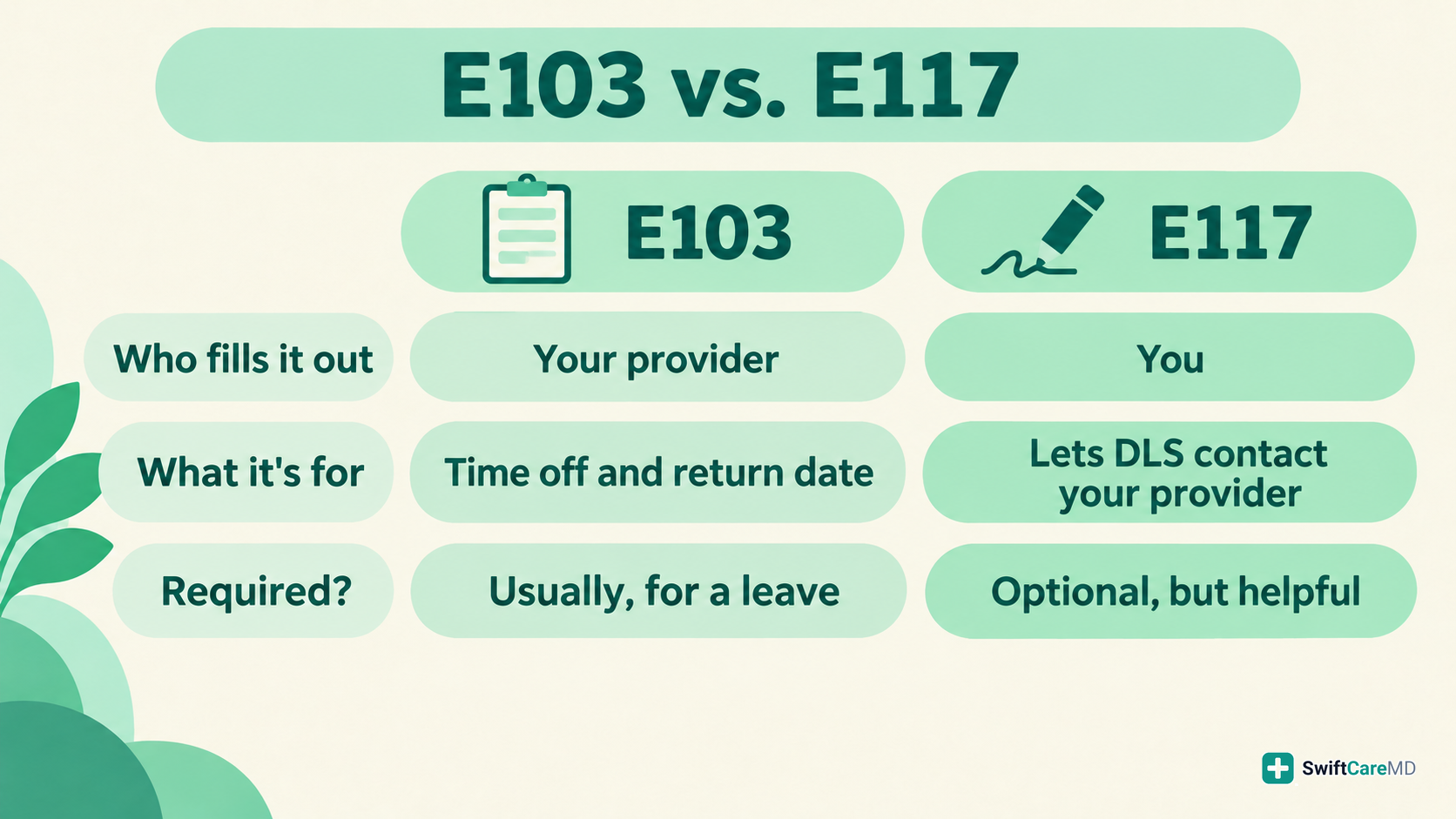
You don't have to sign the E117. Amazon's E117 says, "You are not required to complete this form." But signing it is what lets DLS contact your provider with questions. That's why ours comes with SwiftCareMD's practice already filled in, so if DLS has questions, they know to contact us.
Many workers call the E103 the "Amazon physician statement," but Amazon also has a separate Physician Statement (E106) for short-term disability. Check the form number in your DLS email before you send anything.
What If You Can't Make Your DLS Deadline?
Ask for more time before the deadline passes. Workers on r/AmazonFC say you can email DLS with your doctor's appointment date and ask for a short extension.
If your leave is covered by FMLA, federal rules generally give you at least 15 calendar days to send the form after DLS asks for it. Your exact deadline is in your DLS email.
Just know that DLS may say no to an extension, and missed shifts can keep coming out of your UPT while you wait for an appointment. If your doctor can't see you in time, our patient intake form takes about 3 minutes, and Dr. Nass often reviews requests within minutes during review hours.
Already missed it? Send your forms anyway, then call DLS at 1-888-892-7180 and ask whether they'll still review them.
How to Upload Your Forms From Home
Use the A to Z app, not the DLS portal website. Amazon's own E117 says the portal works only "while on the Amazon network," so if you're home sick on your phone, it may not load.
Here's the path, according to Amazon's 2024 leave guide:
- Go to MyHR and tap "My requests."
- Choose your leave case.
- Tap "files," then "upload file," and add your forms.
If the app gives you trouble, Amazon's forms also list an email, amazondls@amazon.com, and a fax number, 1-855-579-1799.
Here's a tip: upload your forms yourself instead of waiting on a doctor's office to fax them. Workers on r/AmazonFC say faxes to DLS don't always go through, while uploading yourself gets you a confirmation. With SwiftCareMD, if your request is approved, your forms come to you in our secure portal, so you can upload them yourself and screenshot the confirmation.
Will Your Manager See Why You Were Out?
Your manager shouldn't see your medical forms, because they go to DLS, not your manager. Workers on r/AmazonFC point out that DLS handles leaves, not HR.
The E117 also says the information DLS gets "will be used by Amazon DLS only to evaluate" your request. And the doctor's note in our Amazon package doesn't include your diagnosis.
Your Case Says "Pending." Here's What That Means
It means DLS is still reviewing your case, and you're not in the clear yet. Workers on r/AmazonFC explain that the UPT for those days stays deducted while your case is pending. You only get it back if your leave is approved.
That's why a pending case can still push your UPT negative. If that happens, you may get an automated email about it, and one worker said it gave them 48 hours to respond. Answer it right away with your case number and proof that you sent your forms. If you can, bring the same proof to site HR.
A case can't move forward until DLS has the forms it asked for. If you're still waiting on your doctor to fill out the E103, Dr. Nass can review your symptoms online.
Will a Doctor's Note Give You Your UPT Back?
No, a doctor's note won't give you your UPT back. But an approved leave can protect it. Time covered by an approved leave doesn't come out of your UPT, as a federal court noted.
Say you're still sick on Thursday and your UPT is already at zero. If you miss that shift with no other time off to cover it, your UPT goes negative. At that point, Amazon's policy says it "will review" your employment for possible termination. That's why an approved leave matters so much.
What to Do If You're Out of UPT
Here's what to do tonight, before your next shift:
- Report the absence in A to Z.
- Request a leave in A to Z under "Time Off and Leave."
- Get your E103 started. Fill out our patient intake form, choose "Amazon," and add your DLS case number if you have it.
- If you get a termination warning, go to site HR right away. Workers on r/AmazonFC suggest bringing your case number and proof that you sent your paperwork.
For more, read whether you can get fired with a doctor's note.
Why Does DLS Reject Doctor's Notes?
DLS usually rejects a doctor's note because it wanted the E103 instead. But even the E103 can get sent back. Here are the most common reasons and how to fix each one.
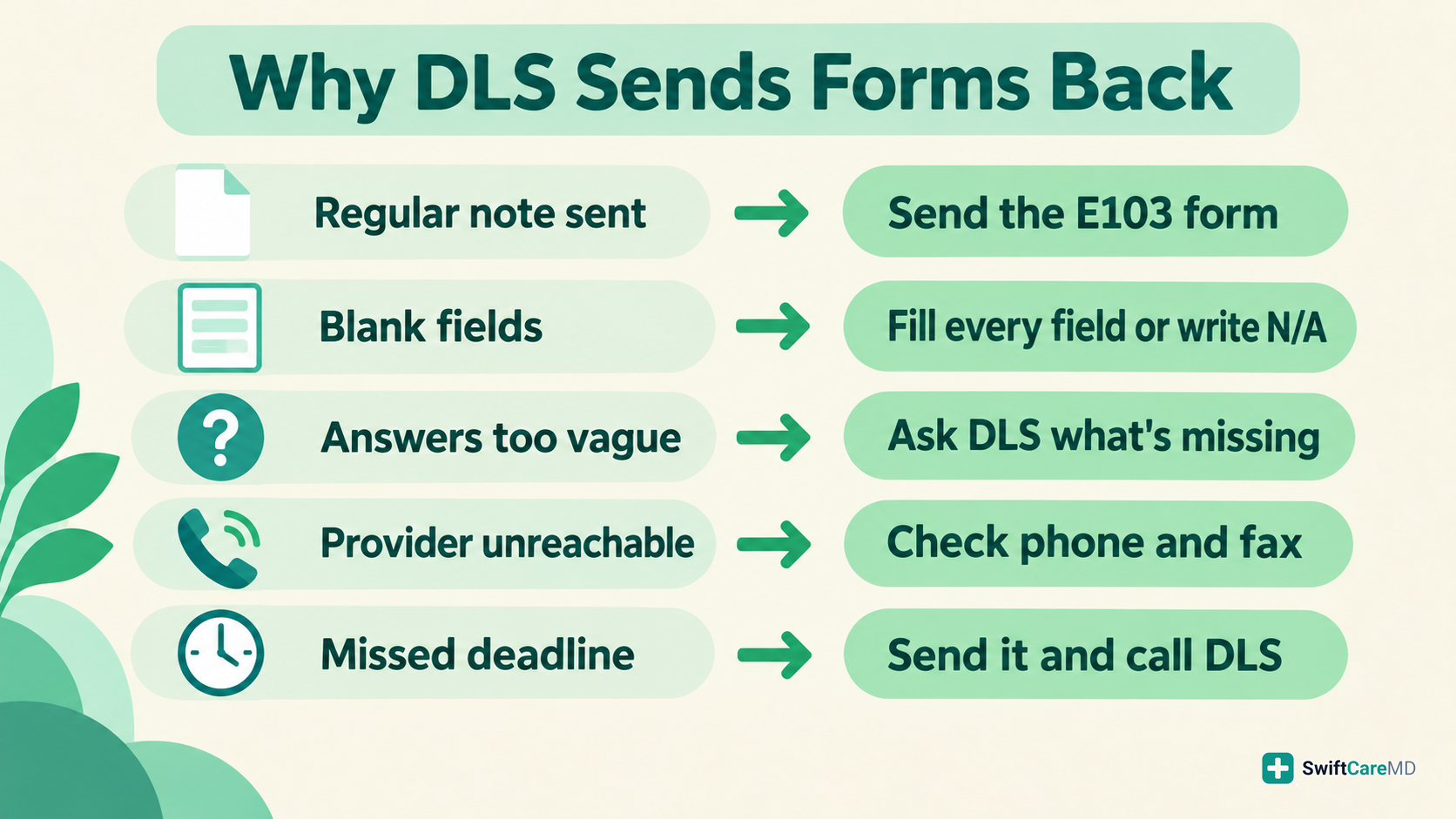
- You sent a regular note. Send the E103 instead. If your doctor or urgent care won't fill it out, Dr. Nass can review your symptoms online and, if it's medically appropriate, fill out Amazon's E103.
- Parts of the form were left blank. The E103 asks providers to write "not applicable" instead of leaving a question empty. Look it over before you send it.
- DLS said the answers were too vague. One worker on r/AmazonFC said their note read "flu/cold, acute viral condition," and DLS still rejected it. Ask DLS which question needs more detail.
- DLS couldn't reach your provider. Make sure your E117 is signed and your provider's phone and fax are on your forms. On SwiftCareMD forms, our practice phone and fax are already filled in.
- The form arrived late. Send it anyway, then call DLS at 1-888-892-7180 to ask if they'll still review it.
Already rejected? Reply to the DLS email and ask exactly what's missing. One worker on r/AmazonFC did just that and wrote, "i just emailed them asking what else was missing and they approved!"
What You Need Before You Go Back to Work
You'll need to tell DLS your return date before you go back. Amazon's 2024 leave guide says you can do this in MyHR. Go to "My requests," choose your case, and pick the return-to-work option.
Depending on why you were out, DLS will either let you self-attest or ask for a release from your provider:
- Self-attest just means you confirm on your own that you're ready to come back. No doctor's paperwork needed.
- A release is a note signed by your provider saying you're cleared to return. If DLS asks for one, upload it to your case in MyHR, the same way you uploaded your forms.
If DLS asks for a release, give it time. Amazon's guide says DLS can take 3 to 5 business days to process it.
And if DLS doesn't have what it needs, your badge may not work when you show up. One worker on r/AmazonFC said their badge wasn't working when they came back, and DLS told them their return-to-work note had to be on file first.
So check your case a few days before your return date to see which option DLS gives you. If your return date is 3 to 5 business days away and you haven't heard from DLS, Amazon's guide says to go to MyHR for contact options.
The Bottom Line
Yes, Amazon accepts doctor's notes. For a sick day, your UPT or PPT usually covers you. For a leave of absence, DLS usually wants Amazon's E103, not a regular note.
If your doctor can't see you before your DLS deadline, or won't fill out the form, Dr. Nass can review your symptoms online and, if it's medically appropriate, fill out and sign your E103.
Start your patient intake form and choose "Amazon."
Frequently asked questions
Can DLS verify my forms?
Yes, DLS can verify your forms by contacting the provider listed on them. On SwiftCareMD forms, that's our practice phone and fax. For more, read whether your employer can call your doctor to verify a note.
Can I get Amazon's form filled out for days I already missed?
Maybe. It depends on your symptoms and when they started, and it's up to the provider. For more, read our guide to backdated doctor's notes.